
Often you do not need an advanced text processor but a virtual scrapbook to quickly write down an occasional thought, a plan for the day or an Internet URL. With a plain text editor, which can be used for this purpose, you have to run the program first, then create a new file, then type a line or two and save the file. Too many things to do in order to simply write down a thought?
With Quicknote, it does not matter which programs you are currently using; whenever you want to write something down that comes to mind, just 'wake up' Quicknote by touching a small line on the top of your screen with the mouse or by pressing shortcut keys. In its resizable window you can jot down your notes and organize them in categories or even sketch small drawings.
Still, this tiny tool has more possibilities than it seems on the first thought! Beneath the normal text functions, it can convert units, let you directly access frequently run programs, encrypt secret texts, change the system volume by hotkeys, manage windows tasks, and even send notes or files through a network. It has also a powerful reminding tool, which can remind you of your notes at certain times, run programs or shutdown automatically your PC. The program is absolutely free, so download this handy tool today and concentrate on content rather than form.
Quicknote runs with Windows 95/98/ME/NT4/2000/XP/2003/Vista/7/8/10, 32 and 64bit and is available in English, German, French, Spanish, Dutch, Swedish, Romanian and Polish.
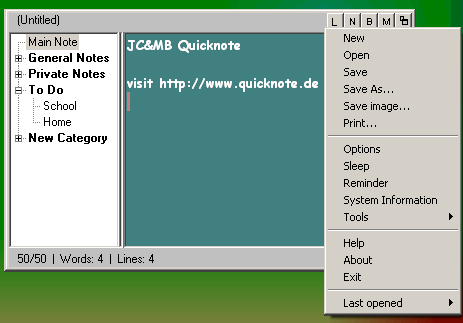
Quicknote's main window - see more screenshots
Through the Wake-Up line Quicknote is always accessible when in sleep mode.
Febuary 14th, 2010: Version 5.5: New Features:
- New wizard to package Quicknote's settings, notes and reminders to copy to another computer or for backup purposes
- Reminder possibility: Remind the last/2nd last/... day of the month
- Feature "Send texts via a network" now supports to send files additionally
- Search and replace supports regular expressions
- Reminder's tasks that occurred during energy saving mode are not forgotten any more
- It is easier to create a new Quicknote form the Main note's contents: Just drag & drop the main note into a category
- Windows 7 and 64 bit compatibility improvements
- A large number of further improvements
December 2nd, 2007: Version 5.4: New Features:
- Unlimited number of reminder's tasks and note-categories can be created
- Full Vista compatibility: Volume hotkeys work with Vista and there is a new QuickText that can be displayed as gadget in the Sidebar
- New possibility to be reminded: When idle for x minutes
- For reminder's tasks that can occur multiple times a day, you can say that they should not be displayed again that particular day
- Notes in the category view can now be set to be saved encrypted
- Focusless input mode: Everything that is written in other windows can be set to appear into Quicknote as well
- Option to start Quicknote directly opened and not in sleep mode
- Images can be added as notes
- Romanian as new language
- A large number of further improvements
If you want to be informed whenever there is a new version, please subscribe to the Quicknote Newsletter.
Back to Jens Home
Quicknote is listed in  , Chip, Tucows, Freeware.de, Prosoftix, 3d2f.com, soft-ware.net, Download Tipp, Fiberdownload, Eurodownload.com, Pcwelt.de, Soft32, Freedownloadscenter.com, Download3000, 3d2f, Freewarehome, Filecart.com, PC-Special, Freewareweb, Freewaredownloads, Winxpfix, Vollversion.de, Freeware Archiv, Terra.es, Freesoftware.nl, iPompe, Rol.ru, Logithèque, Das Download Archiv, Computerbild, c't, T-Online, Giga.de, Snapfiles, Simtel, Softoxi, Top-Shareware.net, ZDNet.
Copyright © Jens Müller 1999-2017